CRM for Small Agencies: What Actually Matters & How to Choose
Managing leads at a small agency gets messy fast.
One inquiry shows up through your website, another pings you on Facebook, someone calls out of the blue, and then a friend-of-a-friend comes in as a referral. Suddenly, you’re juggling calls, WhatsApp chats, emails, spreadsheets, reminders you name it. It's way too easy for important leads to slip through the cracks.
That’s why a CRM should be more than just a digital contacts book.
You need a tool that helps you manage every step of the customer journey from that first “Hey, I’m interested” to “Great, let’s get started.”
So, what do you actually need to track?
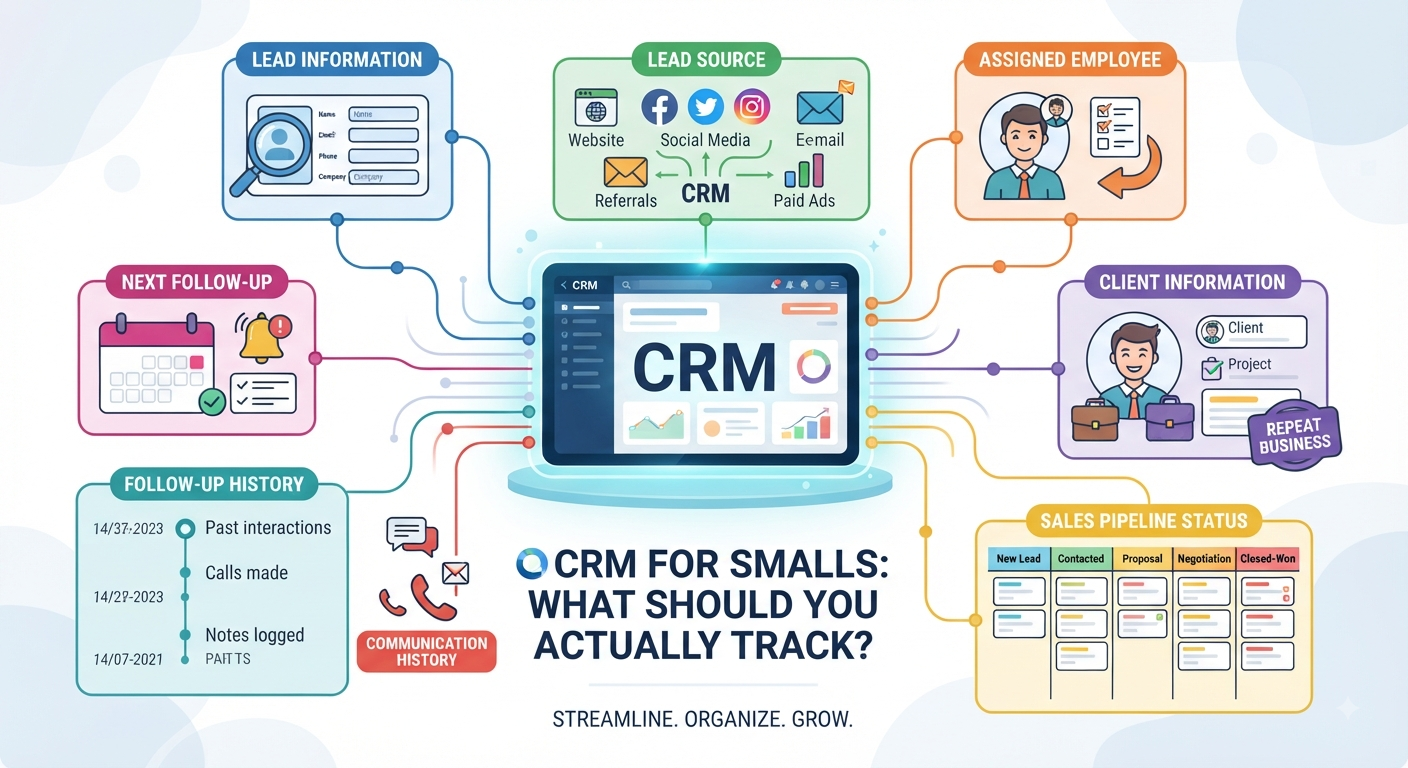
1. Lead Information
Every new enquiry should immediately become a clear record in your CRM.
It needs all the essentials:
- Name and company
- Phone and email
- Location
- What they want
- Key requirements
- Notes that actually matter
- Date they reached out
Salespeople shouldn’t have to dig through old chats or pester a coworker just to figure out who someone is and what they need.
2. Lead Source
If you don’t know where leads are coming from, you’re flying blind.
Your CRM has to show if the lead comes from:
- Your website
- Google search
- Facebook or Instagram
- Paid ads
- Referrals
- Phone calls
- Anywhere else
This way, you’ll see not just who’s reaching out, but where your best clients are really coming from. Sometimes social brings lots of noise, but your website, though quieter, might be sending you the right kind of people.
3. Assigned Employee
Every single lead needs an owner. No “I thought you were handling it” moments.
The CRM must spell out who’s in charge of each deal, from first contact to follow-ups, quotes, negotiations, and (hopefully) closing.
When it’s all clear, everyone knows what they need to do next and you avoid chaos.
4. Follow-Up History
Deals almost never close after just one chat.
People ask for quotes, negotiate, ponder, loop in a partner, request changes, or just disappear for a while. The CRM should keep track of all this:
- Calls and conversations
- What was discussed
- Quotes sent
- Client responses
- Past follow-ups
- Promises made
- Reasons for any holdups
When everything’s recorded, your team gets the full story at a glance. No one’s stuck playing detective in someone else’s inbox.
5. Next Follow-Up
Tracking what’s happened so far is good. Tracking what you’ve got to do next is even better.
Every active lead needs a “next follow-up” date and a clear action. Maybe it’s “Call to discuss revised quote” next Tuesday. Maybe it’s “Send contract Friday.”
This keeps leads warm, deals moving, and nobody forgetting to reach out.
6. Client Information
When a lead finally becomes a client, their info shouldn’t vanish into a black hole.
Your CRM should follow their journey with:
- Updated contact details
- Company data
- What they bought (or signed up for)
- Project details
- Special requirements
- Their assigned employee
- Notes and past interactions
That way, when a client reaches out months later, your team is ready they don’t have to ask the client to re-explain everything from scratch.
7. Sales Status
A raw list of leads just tells you numbers. A sales pipeline tells you the story.
Something simple works:
New → Contacted → Qualified → Quoted → Negotiation → Converted (and Lost for the ones that don’t make it)
With this, you can quickly see:
- How many new leads are waiting?
- Who’s been contacted?
- Who’s waiting on a quote?
- Who’s actively negotiating?
- Which deals closed?
- Where are you losing people?
Way more helpful than a faceless spreadsheet.
8. Communication History
People don’t just talk in one place. They call, email, message on WhatsApp, and meet in person.
That key info should end up in your CRM, in context:
- 12 Aug: Enquiry received
- 13 Aug: Sales call done
- 15 Aug: Quote sent
- 18 Aug: Client asked for changes
- 20 Aug: Revised quote out
- 22 Aug: Next follow-up set
Your team then sees the full conversation no more confusion or lost threads.
Generic CRM vs. Agency-Focused CRM
Generic CRMs let you manage names, deals, and reminders.
But agencies don’t just sell widgets. You need a CRM that actually fits your way of working.
Generic CRM: Stores contacts and basic sales data.
Agency-Focused CRM: Manages the whole journey, tracks context, supports your sales steps, assigns clear owners, follows up properly, records communication, and keeps everything tied together from lead to client.
You don’t just want order you want action.
The Essentials for Small Agencies
Forget bloated systems stuffed with features nobody cares about.
Your CRM should handle the basics that move deals forward:
- Lead info: Who are they?
- Source: Where did they come from?
- Assigned employee: Who’s responsible?
- Follow-up history: What’s happened?
- Next follow-up: What’s the next step?
- Client info: Who are they, and what do they need?
- Sales status: Where are they in your pipeline?
- Communication history: What’s been discussed?
When you connect these, your CRM becomes more than a database. It becomes your sales engine.
From First Enquiry to Happy Client
A solid agency sales flow looks like this:
Lead comes in → Source is captured → Employee gets assigned → First contact made → Next follow-up scheduled → Communication recorded → Quote sent → Status updated → Negotiation → Deal won
Every step has context, ownership, and a plan. That means fewer lost opportunities, more disciplined follow-up, and a clear view of your sales progress.
Give Your Agency a CRM That Truly Tracks the Customer Journey
You work hard for leads. Don’t let them go cold just because information is scattered in too many places.
Bring everything together leads, sources, assignments, follow-ups, client details, pipeline status, and communication history into a single, connected flow.
Pick a CRM that doesn’t just show you who your customers are, but guides your next move.
Capture leads. Assign ownership. Stay on top of every conversation. Build real relationships.
After all, a good CRM doesn’t just store details. It helps your team actually sell.