
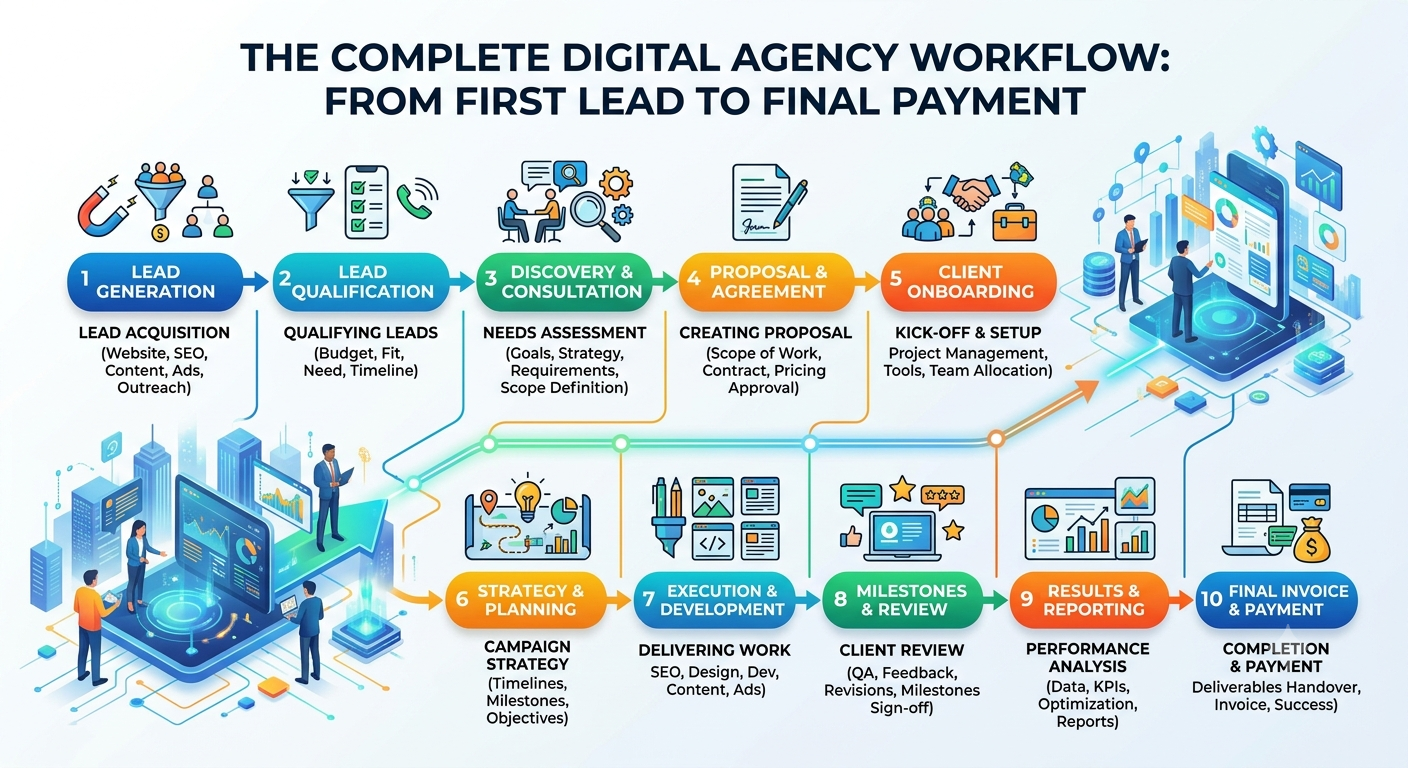
Master the Digital Agency Workflow: Leads to Payments
Running a digital agency isn’t just about chasing projects it’s really about mastering the process behind them. Every website build, SEO campaign, branding gig, retainer, or app launch takes a winding path. That journey starts way before anyone signs a deal and it keeps going long after the money comes in.
Let’s lay it out: Someone reaches out. They become a lead. Their details end up in the CRM. The sales team keeps them warm. Eventually, the lead turns into a client. You prep a quote, get it signed off, raise an invoice, collect payment, and kick off the actual project. Tasks get assigned, work is delivered, expenses tracked, and finally, you ask the big question: Was the project profitable?
Here’s how it usually goes:
Lead → CRM → Follow-up → Client → Quotation → Approval → Invoice → Payment → Project → Tasks → Delivery → Expense
The twist? Most agencies run these steps in silos. Leads are floating around in spreadsheets. Conversations happen over WhatsApp. Quotes, invoices, projects, and expenses each managed with different tools, never really talking to each other.
It still “works”… until growth turns that mess into a costly headache.
- Miss a follow-up? You lose a deal.
- Mess up a quote? Now there’s a scope fight.
- Delay an invoice? Your cash flow stumbles.
- Hand off a project poorly? Your timeline drags out.
- Forget an expense? That so-called “profitable” project suddenly isn’t.
Piecing it all together connecting every stage is how you build a real agency workflow.
What Is a Digital Agency Workflow?
Think of it as the route you follow to turn a random inquiry into a paying project and, eventually, a measured outcome. It’s not just a checklist.
A solid workflow always keeps three things clear:
- What’s already happened?
- What’s next?
- Who’s handling it?
When a new website inquiry pops up, you need more than a name. You should know where it came from, who’s on it, whether they’ve had a response, what they’re asking for, if a quote went out, where the payment stands, and how the project is shaping up financially.
It’s about turning scattered activities into one connected business operation.
The Workflow Starts Before the Sale
Here’s something most agencies get wrong: The workflow doesn’t kick off the moment a client signs a quote it starts the first time you talk.
Miss that first interaction, and the rest gets messy fast.
Let’s break down the journey.
1. Lead: Capture the Opportunity
Every project has an origin story. Maybe your lead arrives via a website form, Google Ads, Facebook, WhatsApp, phone, email, referral, or even networking. Doesn’t matter where it comes from the main thing is to make sure every legit opportunity lands in a system.
That “lead” record should have enough info for your sales team to jump in without hunting through old chats.
Bare minimum:
- Name, company, contact details
- Where they came from
- What they want
- Estimated value
- Who’s working on it
- Status and notes
- What’s the next move
Point isn’t to collect endless leads. It’s to make sure you don’t drop the ball on the good ones.
Miss out on lead management, and here’s what happens: Someone hits you up on WhatsApp, you reply, then the chat gets buried. Nobody follows up. The prospect goes to your competitor no fault of your service, just your process.
2. CRM: Turn Leads Into a Manageable Pipeline
A pile of leads doesn't make a sales process. The CRM turns scattered leads into a live pipeline.
Think stages like:
New → Contacted → Qualified → Proposal → Negotiation → Won → Lost
Now you can see the flow where deals are and what’s coming up.
A good CRM answers stuff like:
- How many leads this month?
- Who hasn’t had a reply yet?
- Which deals are getting serious?
- Who’s in charge?
- What’s the value in the pipeline?
Instead of nagging everyone for updates, just check the pipeline.
More than just contacts a proper agency CRM holds all the relationship history. So whether your salesperson moves on, changes roles, or takes leave, you still have the record. You know what was discussed, what they promised, and what’s next.
3. Follow-Up: Keep the Opportunity Moving
Landing a lead isn’t the same as landing a client. There’s usually a whole dance in the middle. Price haggling, extra service requests, time delays, samples, agency comparisons, waiting for budgets it’s all part of the game.
That’s where follow-up makes or breaks you.
A real follow-up system tells you who needs a call, when, and what you should talk about. Not endless pestering just a professional, timely nudge.
Every active opportunity needs a clear “next action.” If there isn’t one, that deal’s drifting.
4. Client: Create One Source of Truth
When a prospect becomes a client, all the info should move forward don’t start from scratch.
Centralized client profiles hold:
- Company details
- Contacts
- Services bought
- Quotes, invoices, payments
- Projects and tasks
- Notes and history
Super useful with recurring clients website today, SEO tomorrow, social management next month, and so on. With a full client record, you always see the whole relationship, not just the current deal.
5. Quotation: Define the Commercial Agreement
Once you know the requirements, it’s time to pitch the deal. Your quote should spell it all out no grey areas.
- What’s getting delivered?
- What's included/excluded?
- Pricing, taxes, discounts
- Payment terms, timeline
- Validity, T&Cs
Digital agencies get burned by vague scopes all the time. That’s why “Website development – ₹80,000” means nothing until you list what's in that 80K.
A detailed quote is your reference point. Sales, finance, PM, client it keeps everyone aligned.
Don’t just send and forget. Track quote status:
Draft → Sent → Viewed → Negotiation → Approved → Rejected → Expired
Now you know what’s active and what’s history.
6. Approval: Turn the Proposal Into a Confirmed Deal
Sending the quote isn’t the win. You need the client’s sign-off.
Approval is key it locks the scope, pricing, deliverables, payment, timeline, and commercial terms.
Once it’s approved, everything flows naturally into billing. No manual data repeats, no uncertainty.
7. Invoice: Turn the Deal Into a Financial Transaction
Here’s where the agreement becomes a payment request.
If your quote had all the client details right, the invoice should auto-pull from that no manual entry for finance.
What’s usually in the invoice:
- Number, client info, description
- Quantity, pricing, discounts, tax
- Total, payment terms, due date, instructions
Invoice status matters:
Draft → Issued → Due → Partially Paid → Paid → Overdue
Not every “project worth ₹1,50,000” is ₹1,50,000 in the bank. Know what’s actually collected.
8. Payment: Know When Revenue Becomes Cash
Payment is the moment you turn “promise” into real money.
Payment structures vary upfront, milestones, retainers, monthly billing. Doesn’t matter. Payments must tie to invoices.
At a glance, you should know:
Invoice → Amount received → Outstanding → Status
Keep records of date, method, reference, related invoice, and client.
Prevents those classic situations: Project team thinks it’s go-time, finance is still chasing money. A connected workflow shows cash status before work starts.
9. Project: Move From Sales to Delivery
Once commercial bits are set, it’s time to deliver.
Here’s where agencies often trip up. Sales and client know what’s discussed. Delivery gets a vague brief usually a quick “Please start.”
That’s not enough.
The project should inherit all the info from sales: scope, deliverables, timeline, payment, client data, requirements, instructions, who’s on it.
The handover shouldn’t be a scramble to recreate everything.
10. Tasks: Convert Scope Into Action
A project turns manageable when you carve it into actionable tasks. Take a website job:
- Discovery—requirements, content, sitemap, technical checklist.
- Design—wireframes, homepage, inner pages, responsiveness, reviews.
- Development—frontend, backend, database, API.
- Testing—functional, responsive, browser, performance.
- Launch—SEO setup, domain, hosting, deployment, final review.
Now, “website development” means something.
Each task gets an owner, priority, deadline, status, notes, dependencies.
Project manager sees progress. Team owns their piece. Management gets the big