
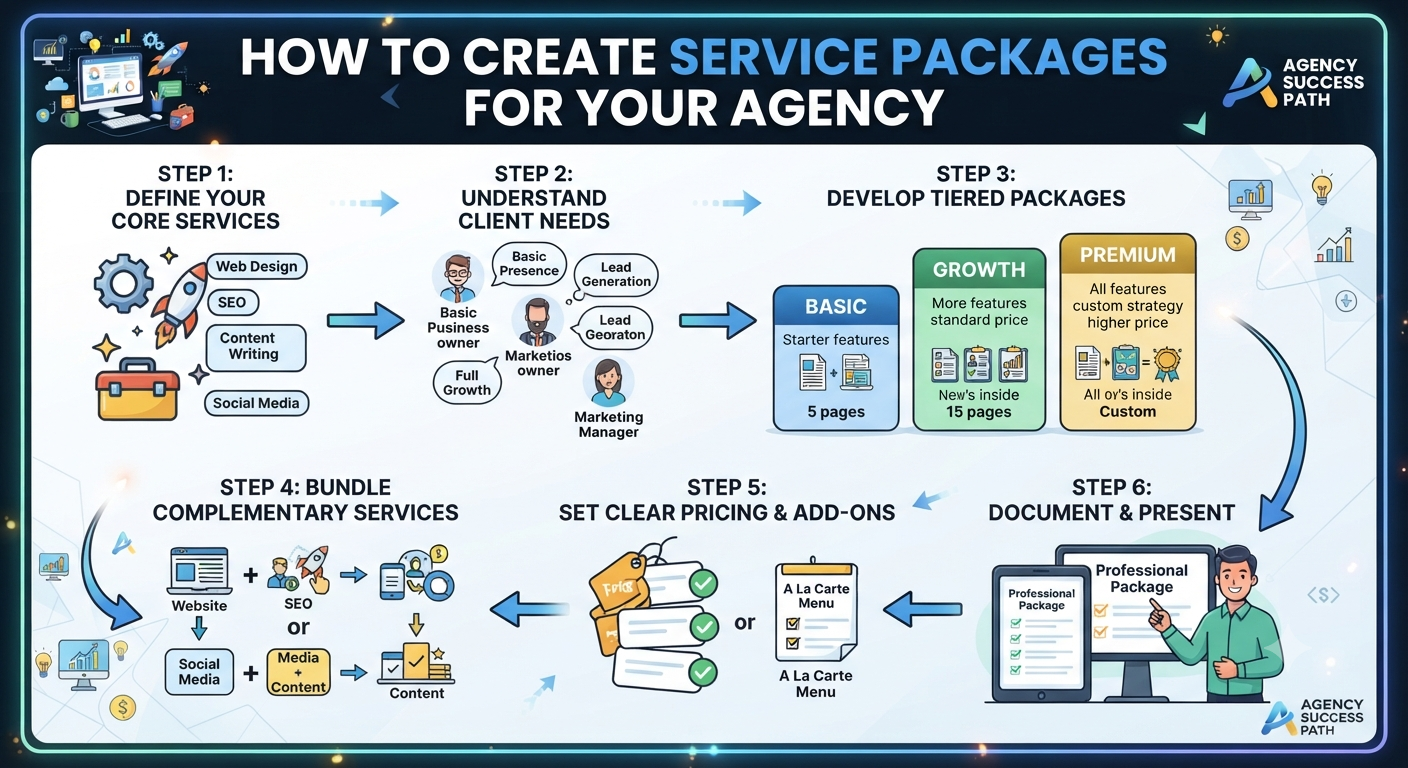
How to Create High-Converting Agency Service Packages
When a client asks, “How much do you charge for a website?” you don’t want your team scrambling to tally up costs on the spot. Ideally, you already know exactly what you offer, what’s included, your pricing, and which service fits which type of client.
That’s the real value in building service packages.
Instead of selling everything à la carte, it’s smarter to set up a clear menu of services grouped into sensible tiers or bundles. Suddenly, selling feels smoother for your team and faster for your clients.
What Is a Service Package?
Think of a service package as a ready-made combo: a collection of services, features, and deliverables at a set price.
So instead of saying:
“Website development is & 30,000. SEO costs extra. WhatsApp integration is extra. Content is extra.”
You can lay out options like:
- Basic Website — ₹25,000
- Business Website — ₹45,000
- Premium Website — ₹75,000
Each package spells out exactly what’s included. That helps the client compare and decide, and your sales team can pitch services without fumbling for details.
1. Build a Service Catalog First
Before you even think about packages, list every service your agency provides. If you’re a digital agency, this might look like:
- Website Design & Development
- E-commerce Development
- Landing Pages
- SEO
- Website Maintenance
- Hosting Management
- Domain Management
- Graphic Design
- Social Media Management
- Content Writing
- Website Security
- Performance Optimization
For each service, nail down:
- Service Name — What’s it called?
- Description — What does the client actually get?
- Unit — Is it per website, per page, per month, or per project?
- Base Price — Your standard entry price.
- Delivery Scope — What’s included and what’s not?
- Optional Add-ons — Extras the client can pick.
This catalog is your foundation for building packages and quoting projects.
2. Build Packages Around Client Needs
After you’ve got your catalog, start grouping services into packages that fit different clients and their needs.
Let’s say you run a website agency. You might break things down like this:
Basic Website Package
Perfect for small businesses just needing a solid online presence.
Includes:
- Up to 5 pages
- Responsive design
- Contact form
- WhatsApp integration
- Google Maps
- Social media links
- Basic on-page SEO
- Basic security
Starts at ₹25,000
This gives clients a clear starting point nothing overwhelming.
Business Website Package
Built for businesses that want more features and better lead generation.
Includes everything in Basic, plus:
- Up to 10 pages
- Custom website design
- Advanced enquiry forms
- Google Analytics setup
- Search Console setup
- Speed optimization
- Basic conversion optimization
- Blog integration
- Additional support
Starts at ₹45,000
This tier offers more than just a basic site it’s designed to drive business.
Premium Website Package
For companies with complex needs and customized requirements.
Includes everything in Business, plus:
- Up to 20 pages
- Advanced UI/UX customization
- Custom functionality
- CMS features
- Advanced integrations
- Advanced SEO
- Performance optimization
- Enhanced security
- Priority support
- Extended maintenance
Starts at ₹75,000+
You’ll tweak exact features and pricing depending on your agency’s costs, expertise, and client profiles. The key is to be crystal clear about what’s included before you start.
3. Make Each Tier Truly Different
Many agencies make the mistake of offering three near-identical packages: Basic (5 pages), Business (10 pages), Premium (15 pages). Sure, the prices change, but the real value doesn’t.
Instead, make each tier match a different client need.
Think:
- Basic → Presence
- Business → Growth
- Premium → Customization
Presence means a client just wants a professional website. Growth means they need lead-gen and more features. Customization is for clients looking for advanced tools and integrations. That’s more meaningful than just bumping up the page count.
4. Create Service Bundles
Packages and bundles aren’t the same thing. Bundles mix services clients often buy together like a website plus SEO and maintenance.
Examples:
Website + SEO Bundle
- Website development
- Basic SEO setup
- Keyword config
- Google Search Console
- Analytics
Website + Maintenance Bundle
- Website development
- Hosting management
- Security monitoring
- Backups
- Updates
- Support
Complete Digital Package
- Website development
- SEO
- Hosting
- Maintenance
- Content support
- Analytics
- Monthly reporting
Bundles make it really easy for your clients to see everything you can deliver.
5. Keep Add-ons as Extras
Standardize your packages, but don’t box yourself in. Sometimes, clients want something outside your usual packages. That’s why an add-on catalog is handy.
Some typical add-ons:
- Extra website page
- Landing page
- Payment gateway integration
- WhatsApp API
- Additional language support
- Advanced forms
- Extra design revisions
- Monthly SEO
- Ongoing maintenance
- Hosting
- Content writing
Add-ons help keep packages simple, while still meeting special requirements.
6. Set Pricing Thoughtfully
Don’t just copy what others charge. Work out your cost: delivery, team salaries, software, overhead, plus your desired profit margin = sustainable price.
Also factor in the time your team spends on:
- Client calls
- Research
- Design
- Development
- Testing
- Revisions
- Project management
- Launch
- Ongoing support
A package that looks profitable on paper can quickly evaporate if you don’t manage scope tightly. That’s why each package needs clear inclusions, exclusions, revision rounds, timelines, and support details.
7. Spell Out What’s Not Included
One of the most important things define boundaries clearly. If your package includes 5 pages and 2 revision rounds, what happens if the client wants 12 pages or 6 revisions?
Set these terms in advance:
Included:
5 website pages, 2 design revision rounds
Extras:
Additional pages or revision rounds cost extra
This protects both your agency and your clients.
8. Use Packages for Faster Quoting
The big win with standardized packages is speed. Without structure, your team wastes time:
- Tracking down prices
- Writing descriptions
- Calculating quantities
- Piecing together a quote
- Checking everything manually
With packages, it’s much easier:
Pick Client → Pick Package → Add Extras → Apply Discount → Generate Quote
Example:
- Business Website Package — ₹45,000
- Landing Page Add-on — ₹5,000
- SEO Add-on — ₹10,000
- Total — ₹60,000
The quote automatically includes service descriptions, pricing, inclusions, exclusions, and terms. That’s a lot less admin headache.
9. Manage Everything in One System
As your agency grows, juggling spreadsheets and manual package building gets messy fast.
A central system links your:
Services Catalog → Package Tiers → Service Bundles → Add-ons → Quotation
For example:
Services Catalog:
- Website Development — ₹25,000
- SEO — ₹10,000/month
- Maintenance — ₹3,000/month
- Landing Page — ₹5,000
- Hosting — ₹X/year
Now you can build packages like Basic, Business, and Premium Website, or mix with SEO Bundles, Maintenance Bundles, etc.
When a client chooses, the system generates the quote using the info already set. It saves you time and keeps everything consistent.
10. Review Packages Regularly
Don’t just set packages and forget them. Look over your actual project data:
- Which packages sell best?
- Which extras come up often?
- Where do you spend more time than expected?
- Which services are truly profitable?
- What do clients keep asking for?
- Which extras should become standard?
- Which standards should become paid add-ons?
If most clients buying your Business Website also add SEO, maybe it’s time for a Website + SEO bundle.
Let your sales and project numbers shape your packages over time.
A Simple Framework for Package Building:
- Step 1 — List Your Services
- Step 2 — Define Each Service (description, pricing, unit, scope, add-ons)
- Step 3 — Identify Client Segments
- Step 4 — Make 2–4 Clear Package Tiers
- Step 5 — Build Bundles of Frequent Combos
- Step 6 — Set Up Add-ons
- Step 7 — Set Scope Boundaries (pages, revisions, timelines, support, exclusions)
- Step 8 — Link Packages Directly to Quotes
Final Thoughts
A well-built service package does more than just tidy up your price sheet it creates a repeatable sales process. Your team doesn’t have to guess what to offer. Clients understand what they’re buying. Pricing stays consistent. Scope is under control. And quotes go out much faster.
You don’t need fifty different packages just a simple, structured system that makes selling and delivering your services easier.
When you organize your services, packages, and bundles right, quoting gets a lot faster and client relationships start off smoothly.