Manage Agency Blog & Portfolio From One System
Running an agency website means juggling a lot of moving parts. Articles, client projects, new services, portfolio updates plus all the little changes you make to attract new business. When things are simple, manual updates work fine. But as you grow, that patchwork approach turns into a headache.
Suddenly, adding a new portfolio project means you’re copying and pasting the same info in several spots. A blog post gets published, but now you have to update internal links or even dive into the code maybe waiting days for a developer to make a small tweak.
It doesn’t have to be this messy.
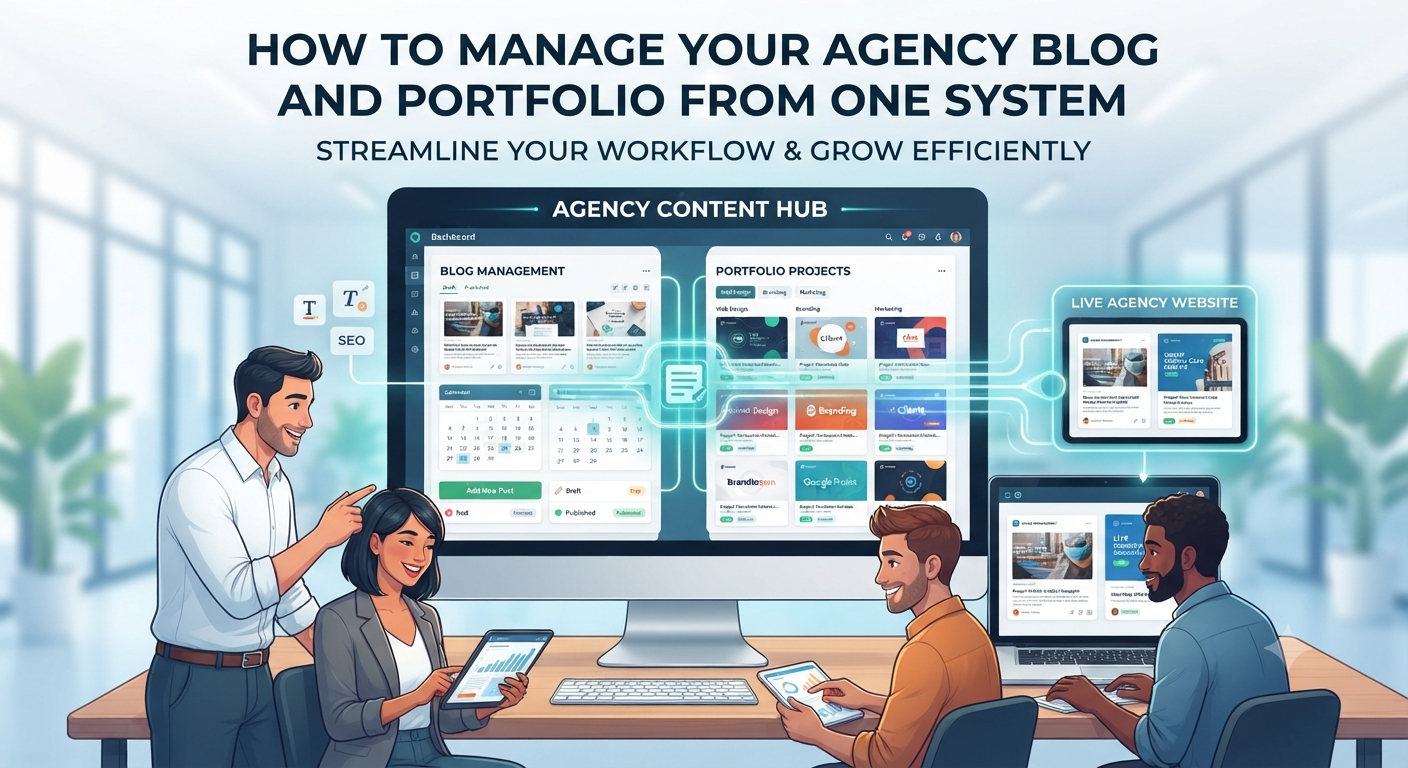
A centralized management system changes the game. Instead of seeing your website as a stand-alone platform, connect it directly to your agency’s internal system. That way, you get one place for managing blog posts, portfolio categories, projects everything you show off to the world.
The website’s job? Just display the content. You focus on keeping it up to date.
Your Website Isn’t Supposed to Be Hard to Manage
A typical agency site starts off simple maybe a few pages hand-coded in HTML, maybe built out with Bootstrap. That’s fine when you’re just beginning.
But the trouble starts when the site grows. Suddenly, you’ve got:
- Dozens of portfolio projects
- Multiple categories
- A steady stream of blog posts
- Case studies and service-specific pages
- SEO tweaks
- Image galleries
Keeping all this organized in code gets exhausting. Tracking down every page for one tiny update wastes time.
You don’t have to rip out what already works. Instead, keep your current site design, but use a centralized content management system to send the content where it needs to go.
1. Bring All Your Blog Content Into One Hub
Your agency blog should do more than just fill up space. A good blog answers potential clients’ questions, demonstrates your expertise, shows off recent projects, educates about your services, and supports your long-term SEO.
But if every new article means wrestling with code or hunting down internal links, publishing won’t happen as often as you’d like.
Centralized blog management makes all that easier. Your team can handle:
- Titles and slugs
- Images
- Content and authors
- Categories and tags
- Publication status and dates
- SEO settings
Writers can create and save drafts, then publish with a click. The website grabs whatever’s live and puts it on display automatically.
You get a simple split:
Agency system = content management
Website = content display
No more endless edits. The system handles the mess.
2. Organize Portfolio Projects The Smart Way
As your agency lands more projects, your portfolio grows and so does the headache of keeping it organized. If you serve diverse industries, people will want to zero in on work that matches their field.
Let’s say someone’s in real estate. They skip straight to your real estate projects. Ecommerce clients hunt for ecommerce work. That’s why portfolio categories matter.
Set up categories like:
- Real Estate
- Healthcare
- Education
- Finance
- Hospitality
- Local Businesses
Add a new project? Just pick the right category. The site auto-updates filters, category listings, and those “see related projects” sections people click on.
No more manual reorganization every time you win a new client.
3. Make Portfolio Project Updates Fast
Your portfolio’s not just about pretty screenshots. Clients want to know what you actually did.
For each project, store info like:
- Project and client name
- Category
- Services delivered
- Technologies used
- Detailed overview
- Gallery of images
- Launch date
- Featured status
- SEO data
Picture this: You complete a fresh real estate website. Instead of calling up a developer to add a page, your team pops into the system, fills in the project details, uploads images, picks “Real Estate,” and hits publish. Done.
The website instantly shows the new project no design changes needed, just fresh content.
How Does This Work If I Already Have a Website?
Good news: there’s no need to start over or throw away your current site.
Your existing HTML, CSS, or JS-based site just talks to your agency management system through an API. When someone visits the portfolio page, the site sends a request for the latest projects. The management system responds with the data; the site keeps its design.
Same for your blog behind the scenes, it pulls content dynamically from your platform using the API.
Let Your Website Focus on Design, Not Data
This setup is all about using each tool for what it does best.
Your website handles:
- Layout and visuals
- Animations and navigation
- User experience
Your agency system handles:
- Blog content
- Portfolio categories and projects
- Images and SEO info
You want to update content? No problem handle it in the system. Want to refresh the site design later? You can, without ever worrying about losing content.
Why Abandon Complicated, Manual Pages?
Here’s how these two methods feel:
The old way
- Make a new HTML file for every project
- Add all the details by hand
- Upload images
- Edit the portfolio listing
- Update categories and links
- Re-upload to the server
For a small site, maybe that’s not a big deal. But if you’re dealing with dozens or hundreds of projects? That’s a waste of your team’s time.
The new, dynamic way
- Open the management system
- Add your project details and images
- Select categories
- Publish
Everything instantly updates.
It’s just a faster, less painful way to work.
One System, One Source of Truth
The real power here is tying your website content back to your business operations.
Your platform becomes the backbone. It holds:
- Leads and client records
- Projects, services, and invoices
- Blog posts and portfolio data
Projects roll right into the portfolio when finished. Services delivered are attached to each project. Blog articles explain how you handle various technologies or industries.
Now, you’re not stuck maintaining scattered data across three separate systems.
Why This Matters When You Grow
Manual content management is workable for the first few projects. Then it just gets out of hand things get missed, old projects live on out-of-date pages, and fixing mistakes means combing through a maze of files.
A central system:
- Cuts down on grunt work
- Keeps everything organized
- Makes publishing and updates simple
- Keeps categories and tags consistent
- Reuses data across your site
- Reduces dependence on your developers for every little edit
- Links website content to your real agency workflow
And down the road? Because everything’s well-structured, you’re set up for even smarter features: search, filters, related projects, author pages new pages you don’t have to build one by one.
No Need to Start Over
Worried about scrapping your current site? Don’t be.
If you’re happy with the look and feel, you can keep it. Just replace the hard-coded content with dynamic data from your new system. The portfolio page layout can stay; your blog design can stay. All that changes is where the content comes from.
You protect the work you’ve already done while making your life easier in the long run.
Start Managing Your Agency Content Smarter
Your website should help your business not give you more busywork. Separate management for your blog and portfolio means data gets duplicated and things slip through the cracks.
Put it all under one roof with a central system. Your team works in one place. Your website always shows the latest and greatest.
Link your existing site to your agency management platform, and start managing blogs, portfolios, and categories all in one spot.
One system, one source of truth so your agency can focus on what really matters: growing.