
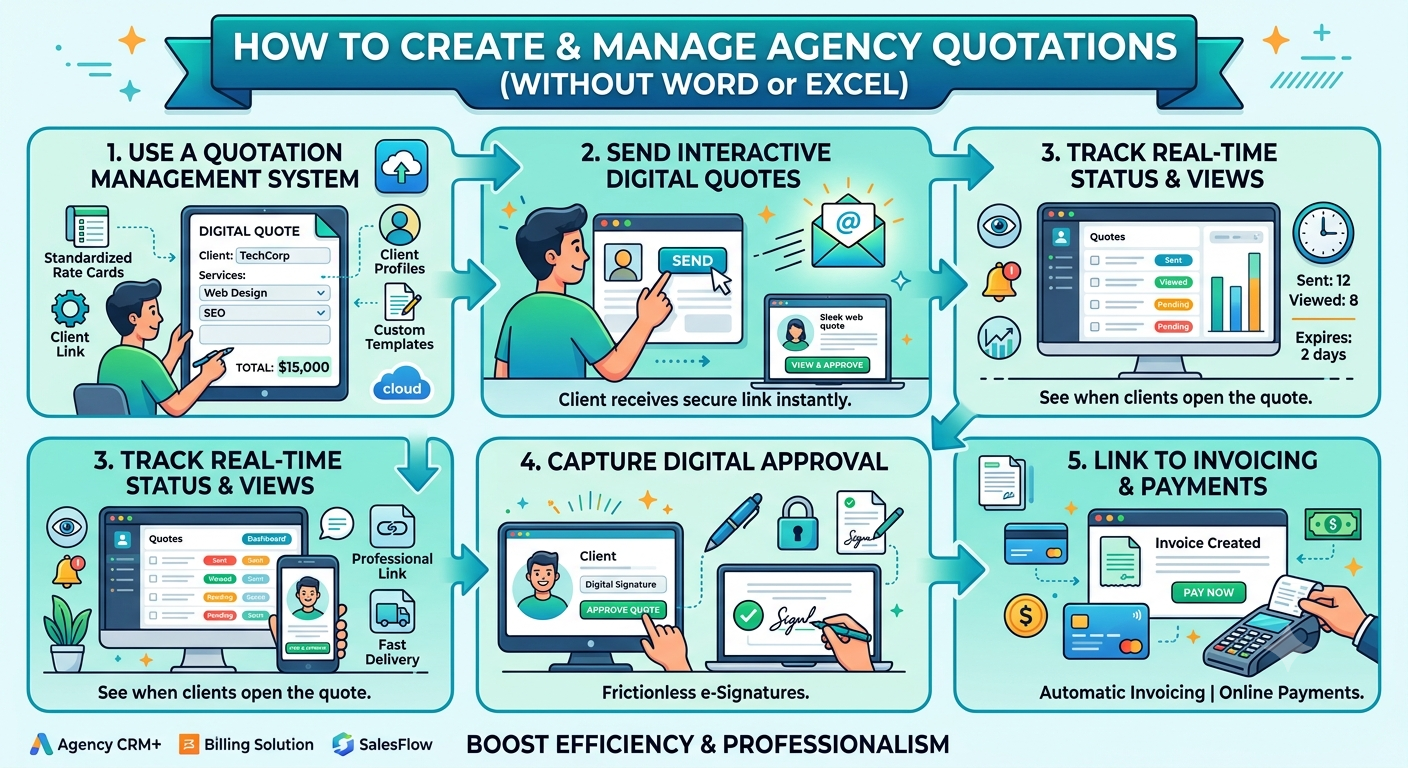
How to Manage Agency Quotations Without Word or Excel
A quotation isn’t just a piece of paper it’s usually the first “official” thing your agency sends to a new client. It sets the stage: here’s what we’ll deliver, here’s the price, this is what you get, and here’s what happens next. But, even though it’s so important, a ton of agencies still rely on Word docs, Excel sheets, PDFs, a tangle of emails, and manual reminders.
For a small team, that old-school method works you can get by. But as your agency brings on more clients, things start slipping through the cracks.
Suddenly, one quote is buried on a salesperson’s laptop, another is a revised file with a new name, pricing might get copied from a random Excel, the client gives the green light over email, and someone else sends a payment request at a different time. Before you know it, your “quote” is really a pile of disconnected info and scattered documents.
There’s a better way: treat quotations as part of your sales workflow, not just as documents floating around.
A modern agency can handle the whole quotation journey creating, pricing, client approval, emails, payments from a connected system. No more depending on Word or Excel for every tiny step.
Why Old School Quoting Gets Messy
Let’s walk through how most agencies do it:
- A new lead arrives.
- Someone writes the quote in Word. They double-check prices in Excel. Then, it’s saved as a PDF and sent by email.
- Now you wait.
- The client asks for a tweak. You revise the quote. Another PDF.
- They want a discount. Change the price again. Another version.
And pretty soon, you’re left asking:
- Which file is the latest version?
- What price did we end up offering?
- Did the client actually approve this?
- When did they do it?
- Is payment still pending?
- Who’s supposed to follow up?
- What happens after payment, anyway?
If these answers are spread out across different apps and emails, the process gets overwhelming quickly.
Honestly, Word and Excel aren’t the villains here they just weren’t meant to handle complex workflows.
1. Create Quotations in a Real System
A professional quote should be simple to make, update, and track not something you build from scratch every time.
Enter a proper Quotations Management module. All the key info client details, services, packages, prices, discounts, taxes, terms lives in one place.
So all your team has to do: pick a client, choose services, review pricing, generate the quote, and send. Done.
Simple process. Standardized output. No more redoing the same work.
2. Bring Pricing Consistency Into the Mix
Pricing errors hurt your agency’s credibility and bottom line.
Let’s say your regular website package is ₹60,000. One salesperson lists ₹60,000, another (looking at an old Excel) quotes ₹50,000, and someone else gives ₹55,000 based on a past deal they remember. Now, clients get three different prices for the same thing.
A solid system lets you lock in standardized prices and approved discounts, so everyone is on the same page. Salespeople don’t need to retype or guess they just select from predefined packages.
You get flexibility for exceptions, but you control the baseline. Less confusion, better margins.
3. Track Every Quotation, Easily
Sending the quote is just the start. The real trouble is knowing what happens after.
Without a system, you end up sifting through emails, WhatsApp messages, or even sticky notes.
A quotations tool tracks the status for you: Draft → Sent → Viewed → Approved → Payment Pending → Paid. If a quote is rejected or expires, you can see that too.
Your team gets a live view of every deal, right when they need it. No need to “ask around.”
4. Make It Simple for Clients to Approve
Old way: email the client a PDF, cross your fingers, and wait for a reply like “Approved, please proceed.”
That works, but the approval is buried in an inbox somewhere.
A modern quoting process lets the client view the quote online, check all the details services, price, terms, everything and click approve. The system logs it.
Now there’s a clean record of approval. No more updating spreadsheets by hand.
5. Manage Revisions Without the Chaos
Revisions are part of agency life. “Remove SEO. Add social media.” “Can you do a better deal?”
With each little tweak in Word or PDF, you wind up with a mess of files: Quotation.pdf, Quotation-Revised.pdf, Quotation-Final.pdf, Quotation-Final-New.pdf...and nobody knows which is the real deal.
A proper system tracks revisions in one place. You get a history of all changes, so everyone’s working off the latest version.
6. Link Your Email, Don’t Juggle It
Email isn’t dead it’s how most clients like to communicate. But managing quote emails by hand? Painful.
How many times do you have to type up new intro emails, reminders, payment requests, and so on?
An integrated workflow handles it. When your quote is ready, the system sends it with the right message. Follow-ups and reminders are connected to the quote and client.
It’s not just “automation.” It’s context: every email ties back to the correct deal.
7. Let Approval Flow Straight to Payment
Here’s a step that saves a ton of hassle.
Usually, quote approval and payment are separate. The client approves, someone makes an invoice, someone else sends the bank details, another person checks if funds arrived, and then you update that old spreadsheet.
A connected system automates this. The moment a quote’s approved, it creates a payment request, sends the client a link, ticks off the payment once done, and moves the project forward.
For agencies needing advance payment, clients no longer have to ask, “How do I pay you?” The answer is already part of the process.
8. Don’t Miss Opportunities That Need Action
A smart quotation system shows at a glance where things stand: which quotes went out, who approved, who hasn’t paid, what’s expired, and what’s been rejected.
This way, your sales team focuses on the right deals. Follow up where payment’s pending, chase approvals, rescue expiring quotes, or check why someone said no.
No more guessing just working the pipeline.
9. Connect Quotes With Everything Else
A quotation shouldn’t float around by itself. It’s just one step in the bigger process: Lead → Requirement → Quotation → Approval → Payment → Project.
When it’s all connected, info flows automatically. Lead comes into the CRM, sales send out the quote, client approves, payment link goes out, client pays, project kicks off. No manual copying. No lost details.
At this point, your quotation tool is more than a document builder it’s your agency’s sales backbone.
10. Give Your Team One Source of Truth
As you scale, more people touch each deal. Sales talks to the client, finance handles payment, the PM delivers, management wants pipeline visibility.
If the info’s scattered, nobody has the big picture. And if someone’s out sick, the team’s stuck.
A central quoting system puts everyone on the same page. See the whole chain from initial lead to payment to next steps so anyone can pick up where things left off.
What a Clean Workflow Actually Looks Like
This doesn’t have to be complicated. In fact, a good workflow is pretty direct:
- Capture the lead: Get the client’s requirements.
- Prepare the quote: Select services, set prices and terms.
- Send: Email it directly through the system.
- Track: Know who’s seen, approved, or rejected it.
- Record the approval: Log it digitally.
- Request payment: Generate and send the payment link.
- Collect payment: Client pays online.
- Move to delivery: Once payment is in, start the project.
In short: Lead → Quotation → Approval → Payment → Project.
Simple for your team. Simple for your clients. And it’s all easy to check.
Why Switching Beats Saving Time
This isn’t just about “automation.” You get:
- Fewer mistakes: Prices and terms are fixed in the system.
- More visibility: Immediate pipeline status.
- Happier clients: Cleaner quotes, simple approvals, smooth payments.
- Smarter follow-up: Clear view of what needs attention.
- Better financial control: Approved quotes lead right into billing.
- Real scalability: The same process works for ten quotes or a hundred, without messy spreadsheets.
When Should You Switch?
Don’t jump just because you send the odd quote. But it’s time if:
- Your team is creating lots of quotations
- Several people handle quoting
- Pricing changes a lot
- Clients ask for lots of revisions
- Approvals are hard to track
- Follow-ups are a mess
- Payments are handled outside of the quoting process
- You’re juggling spreadsheets and management is in the dark
At that point, it’s not about documents; it’s about fixing your workflow.
Final Thoughts
A quote should kick off your structured sales process, not just sit as another file.
If pricing, approvals, emails, and payments all happen in separate silos, your team wastes time and details get lost in the shuffle.
A connected Quotation Management workflow means standardized pricing, tracked revisions, integrated emails, digital approvals, and seamless payment links, all in one place.
Your sales process becomes easier to manage, measure, and scale without just swapping Word and Excel for another tool. You’re replacing a piecemeal quoting process with a connected, reliable workflow.
Build a better quotation process for your agency and leave the chaos behind.