How to Manage Leads from Facebook, Websites & All Sources in One Place
Picture this: a lead pops up on your website. Another arrives through a Facebook form. Someone responds to an ad, and a previous customer sends over a friend’s details. Maybe another enquiry shows up on a platform you barely remember joining. Good news people are finding you! Trouble is, juggling leads from all these channels starts to feel like herding cats.
Leads spill in from everywhere, but your sales process doesn’t follow. One team member checks the website. Someone else downloads Facebook leads. Referrals trickle in through calls and texts. Advertising dashboards pile up. A spreadsheet gets patched up now and then, while important conversations float around half a dozen inboxes.
Pretty soon, the question is no longer, “Are we getting leads?” It’s, “What happened to that one lead?” If you can’t answer that, it’s time to stop adding another spreadsheet and start connecting every lead source to one central system.
More Channels, Less Chaos
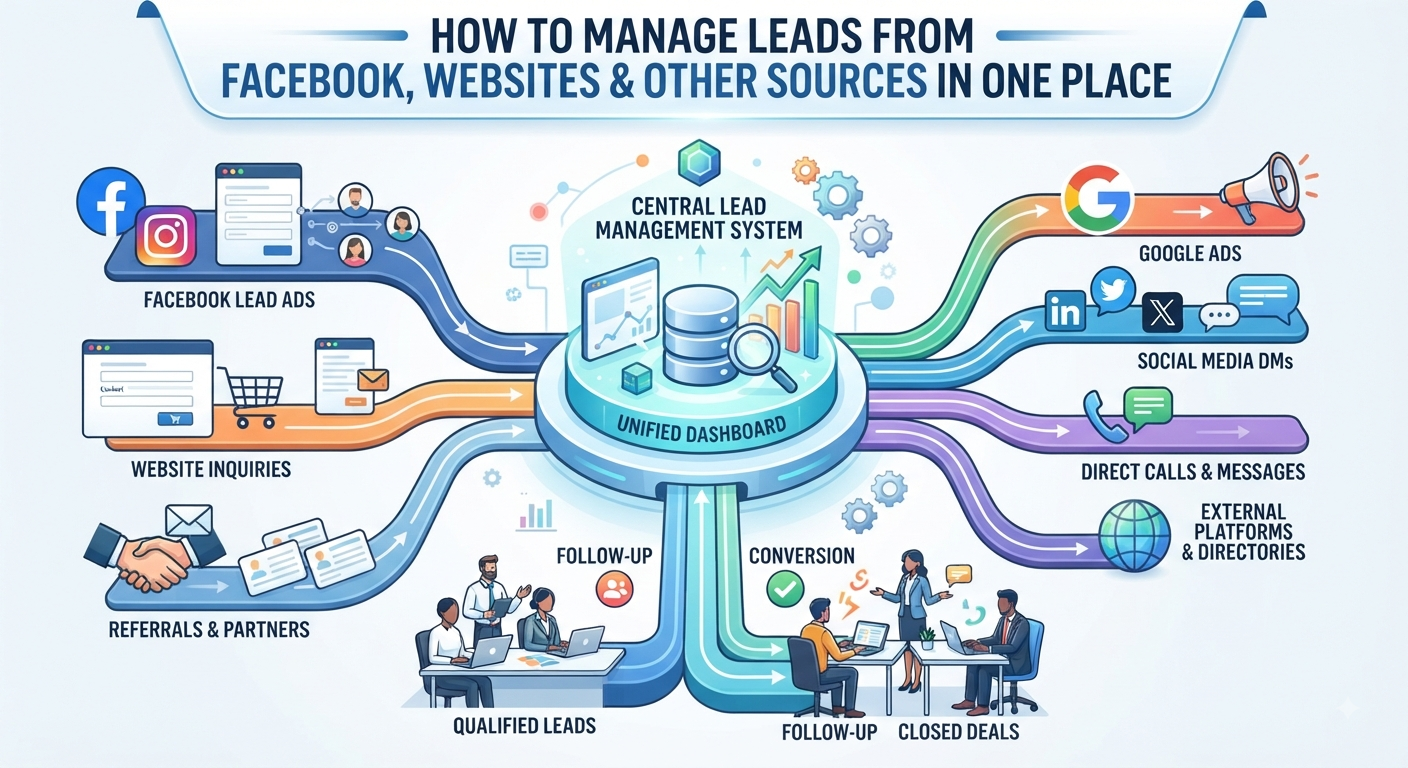
Let’s be honest most businesses don’t rely on one place for enquiries these days. Customers can stumble upon you via website forms, Facebook or Instagram, ads running across Google, referrals from happy clients, directories, landing pages, and even third-party apps.
Each source? Fine on its own. The headache starts after the lead lands. A scattered process means your team keeps bouncing between platforms, searching for new leads and figuring out what to do next.
There’s a simpler way: Bring all those sources into one lead management system. Run one, unified sales pipeline. Where a lead comes from can change. How you handle it shouldn’t.
Start With Your Website Forms
Your website usually introduces you to your most serious prospects. Maybe someone fills out a contact form or requests a quote, books a call, asks a product question, or wants a callback.
Here’s the snag: after hitting “Submit,” all that’s happening is someone (hopefully) reads the notification, copies stuff across to wherever you’re tracking leads, assigns the lead, and follows up if they remember.
Every manual step means a chance the lead will slip through the cracks. The fix? Connect your forms directly to your lead system. That way:
- Visitor submits the form
- Lead’s created instantly
- Website is marked as the source
- It’s assigned right away
- Your salesperson steps in
- Everything’s logged in your pipeline
You can even pull in things like landing page sources or UTM details, lining up your marketing and sales data so you actually know what’s working.
Bring Facebook and Social Leads Under One Roof
Facebook and Instagram can generate leads without people even leaving their feed. That’s convenient for prospects, but you end up managing yet another inbox. Prospects fill out a form, the marketing team celebrates… but does the right salesperson get the lead?
Integration solves this. Meta lets you sync collected leads with your CRM, so everyone’s working from the same playbook. Don’t let Facebook leads sit in isolation pipe them right into your sales system and run them through the same process as website enquiries, from assignment to follow-up through to conversion.
A Facebook lead is just another opportunity in your pipeline. No need for special treatment.
Connect Your Ad Leads to Sales, Not Just Marketing
Marketing’s happy with clicks, impressions, or cost per lead. Sales wants actual customers. Here’s where a connected CRM changes the game. You don’t just look at “ad → lead.” You track every step: “ad → lead → contacted → qualified → proposal → customer.”
This is how you figure out whether Campaign A (with 100 leads and 3 sales) is really better than Campaign B (with 50 leads and 10 sales). Transfer lead source data right along with each enquiry. Knowing which campaigns turn leads into customers not just which pad your numbers matters.
Referrals Need Tracking Too
Referrals are gold, but easy to lose in the shuffle. Someone calls and says, “Hey, I sent my friend your way.” Maybe a client texts you someone’s contact info. These are valuable, but often lack structure.
Don’t let referrals slip by. Create a lead in your system, mark it as “Referral,” add notes, and track it like any other opportunity. Over time, you’ll see how much your network actually brings you not just hope your memory’s sharp.
Don’t Leave External Platforms Out
Maybe you use marketplace listings, directories, or custom tools that pull in leads. You don’t have to ditch them; you just need a way to funnel their leads into your main system. Integrations, webhooks, and APIs turn those stray channels into part of your pipeline.
Now, instead of chasing down details, you’re capturing them right where you work.
Don’t Lose the Source
Centralizing leads doesn’t mean you forget where they came from. Keep the original source attached to every lead. That way, you’re not guessing you know which channels generate the best leads, which campaigns are worth it, and which ones just create noise.
Here’s what that looks like:
- Rahul | Website
- Priya | Facebook Ads
- Amit | Referral
- Neha | Google Campaign
- Rohan | External Platform
When you track sources consistently, you can measure quality, not just quantity. You can see if referrals convert better than paid ads, or which campaigns actually deliver customers.
One Lead. One Owner. One Story.
Having all your leads in one spot is great, but someone still needs to take ownership. Every lead should have a clear owner and full history inside the CRM. Anyone in your team should be able to open the lead and see where it came from, who’s working it, what’s been said, the status, the next follow-up date, even the last conversation note. No more asking around everything’s right there.
Build Integrations Once Then Let Them Run
Add structure with a Lead Sources & Integrations module. Set up standard sources website, Facebook, Instagram, Google Ads, referrals, marketplaces, partners, APIs. Leads are automatically tagged, and if not, your team can select the right one when adding leads by hand.
Stay consistent. Whether leads come in through plumbing or are copy/pasted, everyone flows through the same sales pipeline.
API Power Connect Anything
Sometimes your lead sources won’t have ready-made integrations. A lot of the time, an API or webhook does the trick. With this, external platforms push new leads directly into your CRM, complete with names, numbers, emails, source info, campaign data, and whatever else you need.
Your sales team doesn’t need to understand the tech. All they see is a new lead, ready to work, right where they expect.
Automation Helps, Visibility Wins
Sure, integrations save time. But that’s not the biggest win. When all your leads are under one roof, you finally get real visibility. You see uncontacted leads, who owns what, all the activity, who did the last follow-up, which sources are converting, and who’s dropped the ball.
No more detective work. Just open your CRM and see the real picture.
What a Connected Lead Workflow Looks Like
Say you get five leads today:
- 9:10 AM — Website enquiry
- 10:25 AM — Facebook Lead Ad
- 11:40 AM — Referral call
- 1:15 PM — Ad campaign lead
- 3:30 PM — External platform
They all show up in a single dashboard, with source info, owner, recorded conversations, scheduled follow-ups everything in one system. Leads don’t vanish, you don’t double-handle, and sales doesn’t miss a beat.
Your CRM Is Your Sales Home Base
Let customers reach out however they like. Your sales team always works from one spot. Website forms pipe leads straight in. Social and ad platforms sync directly. Referrals get logged instead of lost in memory. External sources link through APIs. Every lead moves through one, clear sales process.
Start Managing Opportunities, Not Just Platforms
You don’t lose leads because of where they came from. You lose them when no one notices, owns, or follows up. The more channels you add, the more important it is to bring everything together. Feed all leads website, social, ads, referrals, and platforms into one pipeline.
So next time someone asks, “Whatever happened to that enquiry?” your team doesn’t waste time searching. They open the CRM and just know.
Connect every lead source. Put your sales pipeline in one place. Capture every opportunity, track it from start to finish, assign ownership, and turn more leads into customers.
All your leads, all your activity one process, one place. That’s how you stop losing leads and start closing more deals.